Zapper is a wallet-first workflow for reading DeFi positions before taking action
Zapper is a wallet-first DeFi dashboard built around one practical job: showing what an Ethereum address owns, where those assets sit, and which on-chain actions are available from the same screen. It brings token balances, LP positions, NFTs, and protocol exposure into a single portfolio view, then supports transactions such as swaps or zaps when the connected wallet is ready to move funds.
Start with the wallet, then inspect the positions
The useful angle is not simply that a dashboard exists. The useful angle is sequence. A person opens a wallet, sees ETH, stablecoins, wrapped assets, Uniswap LP tokens, lending balances, and collectibles, then decides whether anything needs attention. That is different from jumping straight into a swap page or a farm page with only one protocol in view.
The strength of Zapper is that it treats the wallet as the primary object. A public address gives a read-only picture of holdings, while a connected wallet becomes the signer for actions. This matters because DeFi positions rarely live in one place. A single address might hold spot tokens, a Curve position, an Aave supply balance, a claimed NFT, and idle USDC at the same time.
That layout gives the user a portfolio map before the user signs anything. Balances are grouped into recognizable categories, protocol names make the position easier to understand, and the wallet becomes easier to audit after weeks of trading, minting, bridging, and claiming rewards across Ethereum and EVM networks.
How a zap turns one asset into pool exposure
A zap is a bundled transaction path that takes an input asset and routes it toward a target DeFi position. For a liquidity pool, that means the tool calculates the required token mix, performs the needed swap steps, and deposits into the pool contract so the wallet receives the resulting LP exposure. The user reviews the route, network fee, slippage setting, and approval before signing.
Inside Zapper, a zap is most useful when the alternative would involve multiple manual steps: swapping ETH into two assets, approving each token, depositing into a pool, and checking that the LP token landed in the wallet. The workflow compresses those steps into a single interface, while the blockchain still records the underlying calls and charges gas for execution.
The important detail is ownership. The connected wallet signs the transaction, the smart contracts settle it, and the resulting position remains tied to the user address. That makes the dashboard useful after the transaction as well as before it, because the new LP position appears alongside the rest of the wallet's holdings.
NFTs and fungible tokens belong in the same review
NFTs change the way a wallet is read. A portfolio made only of ERC-20 balances misses collectibles, gaming assets, access passes, and profile identity markers that sit beside DeFi balances. Zapper displays NFTs as part of the same wallet context, so the address looks like a full on-chain account rather than a spreadsheet of token tickers.
This combined view helps when a wallet has become crowded. The owner can separate liquid assets from collection items, spot unfamiliar tokens, and understand why the address looks different from a simple exchange account. It also gives a cleaner starting point before moving funds, because an unexpected NFT or token balance is easier to notice when the full wallet is visible.
Gas, approvals, and slippage before sending
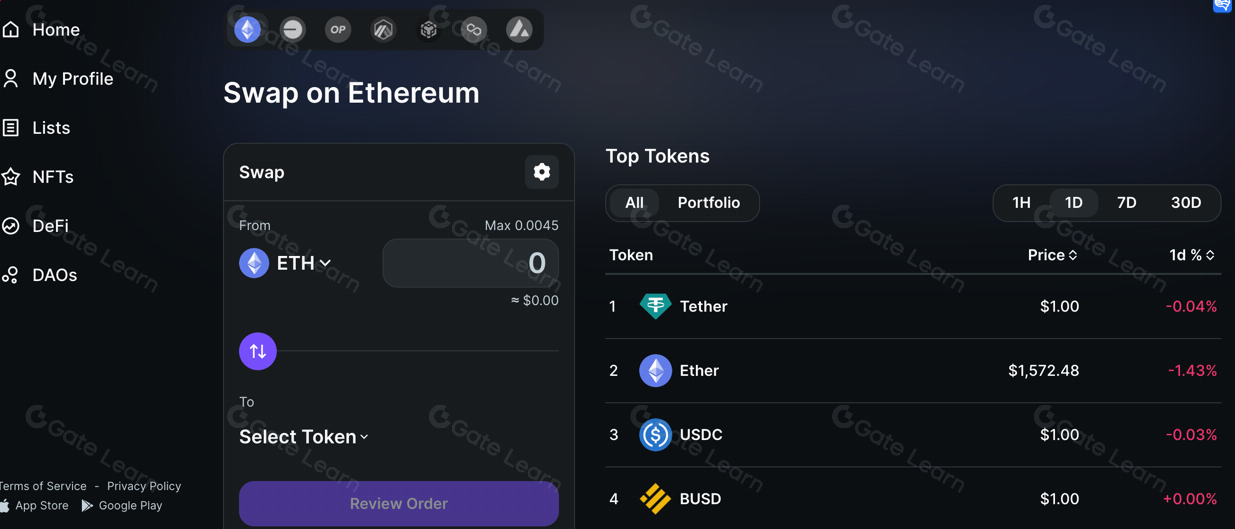
Every transaction that changes state needs a network fee and a signature. Swaps, deposits, withdrawals, and zaps also involve token approvals when an ERC-20 contract must let another contract move funds. A good session pauses at that review screen and checks the spender, asset, amount, destination protocol, and expected output before the wallet prompt is accepted.
Transactions through Zapper still face the normal mechanics of Ethereum DeFi: gas rises when blockspace is busy, slippage widens when liquidity is thin, and a failed transaction burns the gas spent to attempt it. The shortest useful caution is this: read the wallet prompt as carefully as the dashboard, because the signature is the commitment that matters on-chain.
When the dashboard beats a block explorer
A block explorer is excellent for proof. It shows contract calls, token transfers, logs, hashes, and timestamps. It is less comfortable for day-to-day portfolio reading because it expects the user to know which contract matters and how to interpret the call data. A wallet dashboard translates those raw facts into assets, protocols, and positions.
This is where Zapper is faster for routine questions. Is there idle ETH sitting on the address? Did the liquidity withdrawal arrive? Which tokens remain after a bridge or swap? Does the wallet still hold exposure to a pool that the owner forgot about? The page answers by organizing the address, while a block explorer remains the better tool for drilling into a specific transaction hash.
DeBank, Zerion, and MetaMask Portfolio in the same workflow
Zapper belongs beside other wallet portfolio tools rather than replacing every one of them. DeBank is known for broad wallet and protocol tracking across DeFi. Zerion combines portfolio viewing with wallet and trading features. MetaMask Portfolio fits naturally for users who already live inside the MetaMask ecosystem and want a familiar account-level overview.
The difference is workflow emphasis. This tool's zap heritage makes it especially relevant when the next action is entering or exiting a DeFi position rather than only looking at balances. A user comparing dashboards should care less about brand loyalty and more about whether the specific wallet, chain, NFT collection, and protocol position are rendered clearly before a transaction is signed.
A first-session routine that keeps the screen useful
A productive Zapper session starts with observation, not action. Open the address, scan the major balances, expand protocol positions, then compare that view with what the wallet owner expects to see. Surprises deserve attention before swaps or deposits. An unknown token, an old approval, or a forgotten LP position changes what the next transaction should be.
- Confirm the active network before preparing a transaction.
- Check ETH or the relevant gas asset for the chain being used.
- Review token approvals when a zap or swap asks for permission.
- Compare expected output with pool liquidity and slippage settings.
- Save the transaction hash when the wallet submits the action.
Once the first review is complete, the dashboard becomes a maintenance surface. It helps with periodic portfolio checks, tax-time reconstruction, NFT inventory review, and position cleanup after several months of DeFi activity. Zapper is most valuable when it reduces the distance between seeing a wallet clearly and taking the next deliberate on-chain step.
Zapper questions worth asking
Do I need to connect a wallet to view positions on Zapper?
A public address is enough for a read-only look at visible on-chain assets, so wallet connection is not always required for inspection. Connecting a wallet becomes necessary when the user wants to sign a transaction, approve a token, swap, deposit, withdraw, or use a zap. Read-only viewing and transaction signing are separate parts of the workflow.
Fees on Zapper transactions come from where?
The main unavoidable cost is the network gas fee paid to execute the transaction on Ethereum or the selected EVM chain. A swap or zap also reflects liquidity, route pricing, and slippage in the expected output. Token approvals are separate transactions when a contract needs permission before moving an ERC-20 asset.
What happens if a zap transaction fails after signing?
A failed transaction does not complete the intended swap or deposit, so the target LP position is not created. The wallet still pays the gas used by the attempted execution because validators or sequencers processed the transaction. After a failure, the transaction hash is the best starting point for checking the revert reason, gas spent, and whether any approval happened first.
Can Zapper show assets held on Layer 2 networks?
It is built for Ethereum-style wallet activity, so the most relevant use cases include Ethereum mainnet and EVM networks where DeFi positions, NFTs, and token balances share the same address format. Coverage varies by integration and asset type, which is why a missing position is worth checking against the protocol app or a block explorer before assuming the asset moved.
Why would a liquidity provider use a zap instead of depositing manually?
A zap reduces the number of screens involved when one asset needs to become a balanced liquidity position. Manual depositing gives more direct control over each swap, token amount, and pool step. The zap workflow is most attractive when speed and a clear route preview matter more than hand-tuning every leg of the transaction.
Is a Zapper portfolio view enough for tax records?
The portfolio view helps reconstruct what an address held and which protocols were involved, but formal records need transaction-level detail. Wallet owners still need hashes, timestamps, transfers, cost basis data, and realized disposal events from the underlying chains. A dashboard is a useful starting point for organization, while tax software or an accountant needs the full activity history.